
What Is an Invoice in CFO12?

An invoice is a document you send to a customer requesting payment for goods or services provided. Go to Get Paid > Invoices in the left sidebar.

Last updated

Quick answer

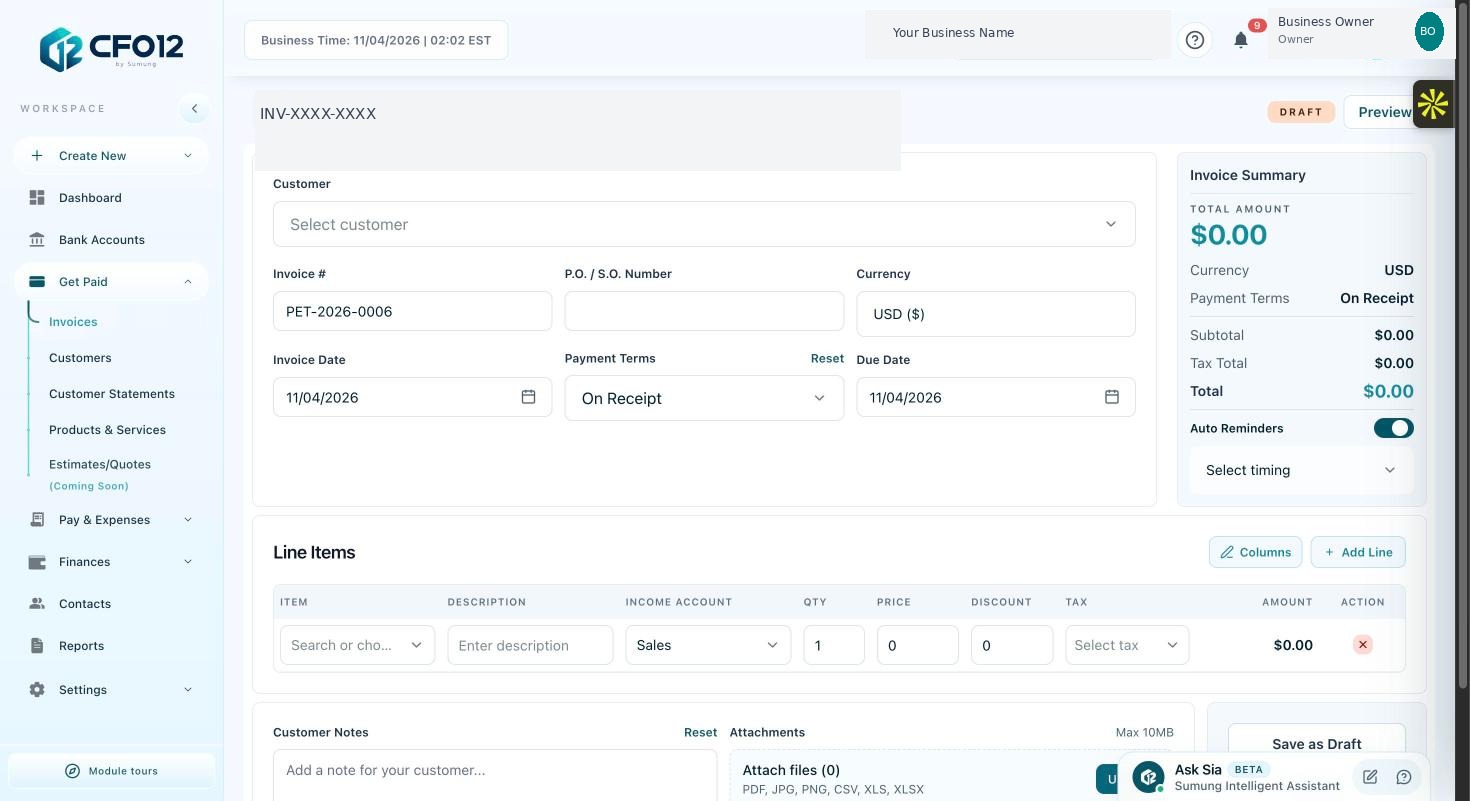
An invoice in CFO12 is a document you send to a customer requesting payment for goods or services you provided. Open Get Paid, then Invoices, in the left sidebar. Each invoice has a Customer, Invoice #, Invoice Date, Due Date and line items, and can be saved as Draft, approved, or sent directly.

An invoice is a document you send to a customer requesting payment for goods or services provided.
What Is an Invoice in CFO12? screenshot

What You Can Do

  1. Go to Get Paid > Invoices in the left sidebar.
  2. An invoice includes fields like Customer, Invoice #, Invoice Date, Due Date, and line items.
  3. Each line item can include an item name, description, income account, quantity, price, discount, and tax.
  4. Invoices can be saved as Draft, Approved, or sent directly to the customer.

💡 The Invoice # is auto-generated but can be edited manually.

Related Articles

Was this article helpful?

Your feedback helps us improve our documentation.

Frequently asked questions

Can I change the invoice number?

Yes. The Invoice # is generated automatically, but you can edit it manually on the invoice form.

Can my customer see a draft invoice?

No. Draft invoices are saved in your Invoices list but are not visible to customers until they are approved and sent.

How is an invoice different from a bill?

An invoice asks your customer to pay you, so it is money owed to your business (accounts receivable). A bill is a vendor asking you to pay them, so it is money your business owes (accounts payable).

Complete guideInvoicing and getting paid in CFO12: complete guide