
How to View All Overdue Bills

Overdue bills are those past their due date that remain unpaid. Go to Pay & Expenses > Bills. Filter by status or use the date range to identify bills past…

Last updated

Quick answer

Overdue bills in CFO12 are bills past their due date that still have an outstanding balance. Go to Pay & Expenses → Bills and filter by status or date range to find bills past their due date. For a formal overdue age breakdown, open Reports → Aged Payables. Pay overdue bills promptly to avoid late fees.

Overdue bills are those past their due date that remain unpaid.
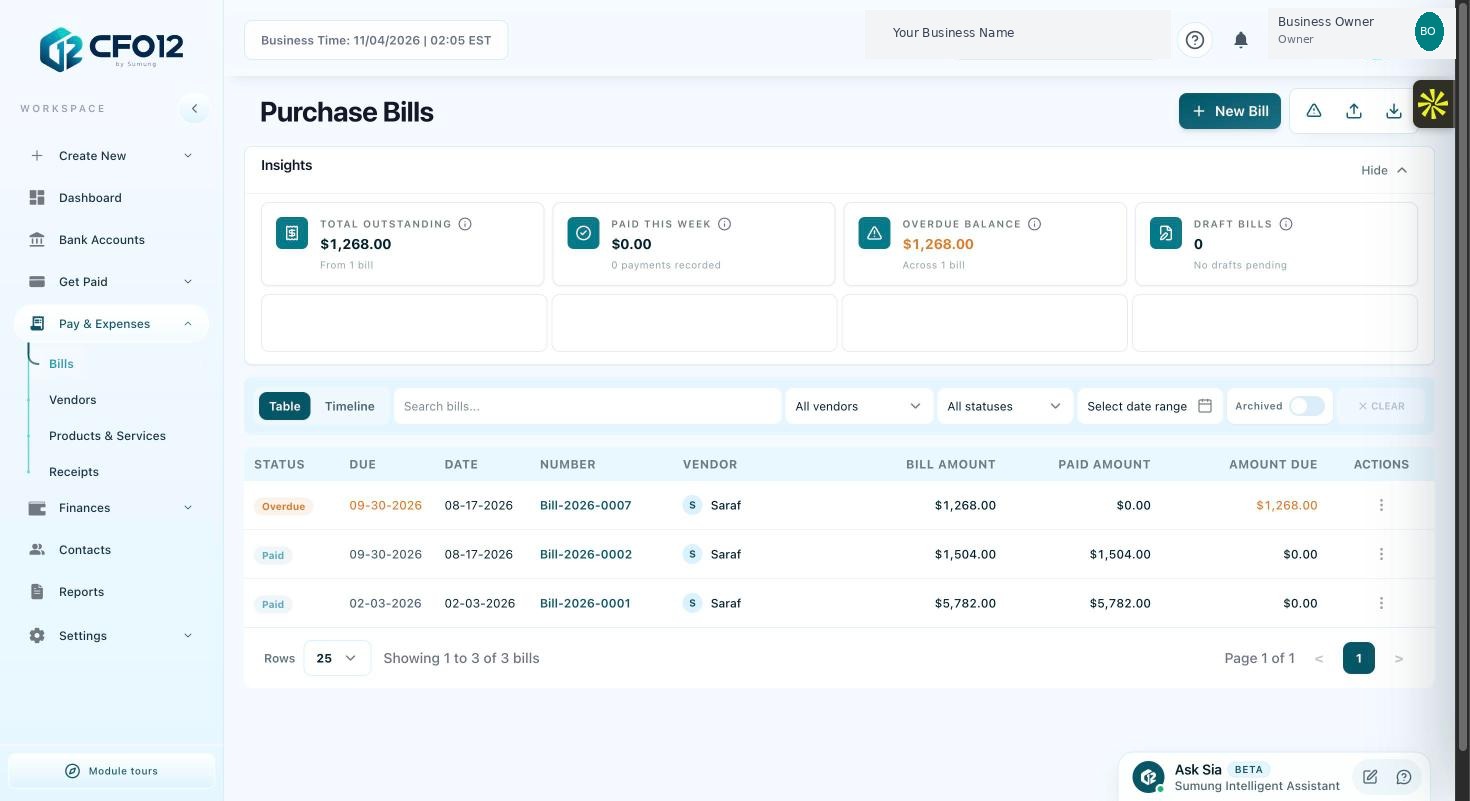
How to View All Overdue Bills screenshot

What You Can Do

  1. Go to Pay & Expenses > Bills.
  2. Filter by status or use the date range to identify bills past their due date.
  3. Bills past the due date with an outstanding balance are overdue.
  4. Also check Reports > Aged Payables for a formal overdue age breakdown.

💡 Paying overdue bills promptly protects your relationships with vendors and avoids late fees.

Related Articles

Was this article helpful?

Your feedback helps us improve our documentation.

Frequently asked questions

How do I make sure a bill becomes overdue on the right date?

Set an accurate Due Date on the bill that matches your agreement with the vendor. The due date is used for Aged Payables calculations.

What does the Aged Payables report add over the Bills list?

Aged Payables gives a detailed breakdown of unpaid bills by how long they are overdue, and shows outstanding amounts by vendor.

Will an overdue bill stay overdue once I pay it?

No. When you record a payment covering the full amount, the bill status updates to Paid and it no longer has an outstanding balance.

Complete guideBills and expenses in CFO12: complete guide